
Affiliate platforms: questions to ask before you migrate (SaaS)
A practical checklist for migrating affiliate platforms in SaaS: what to export, how to compare ledgers, how to handle refunds and clawbacks, and the safest cutover plan.
Read articleBest Paddle tracking software options for affiliate programs using subscriptions, refunds, and recurring commissions
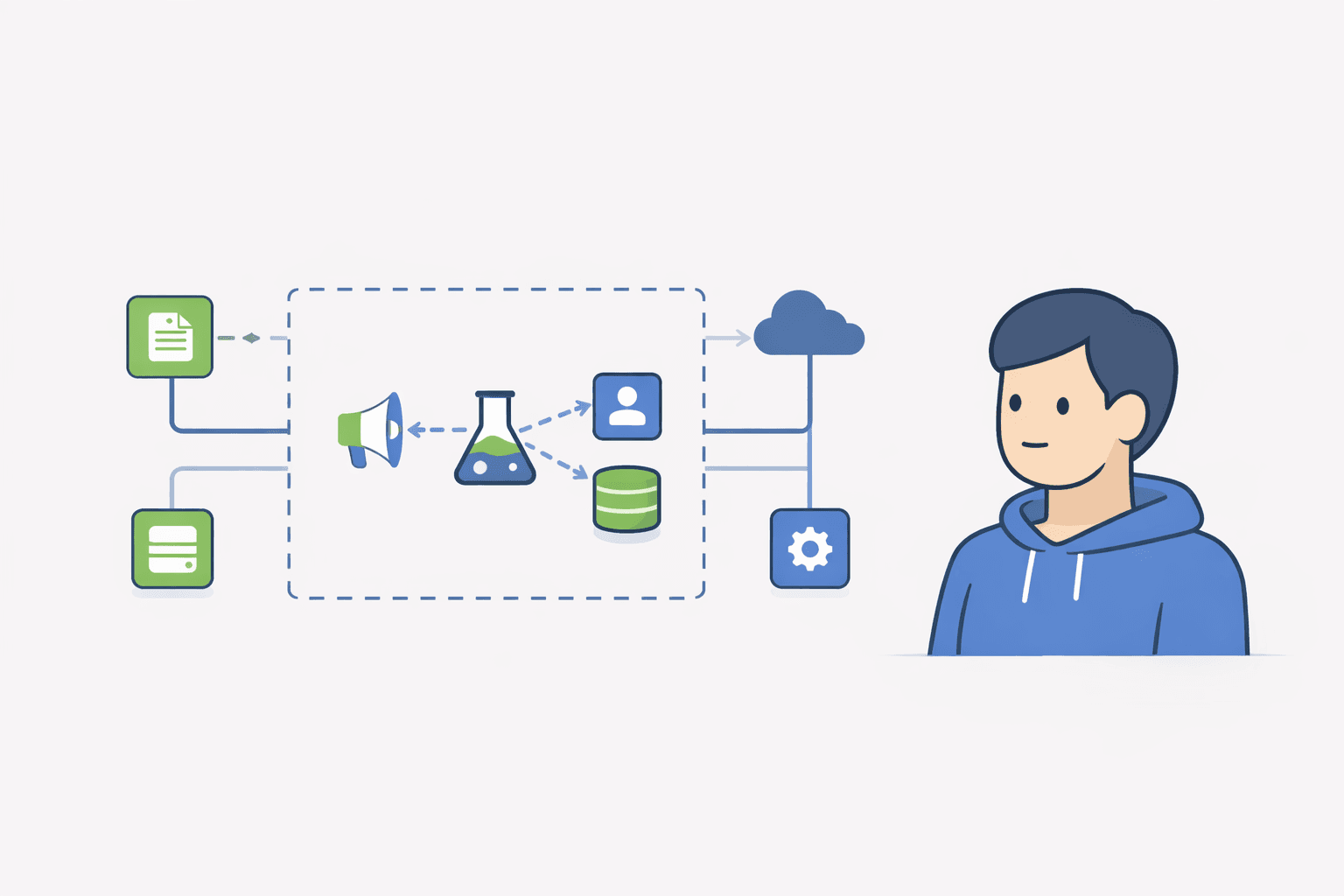
If you are trying to choose Paddle affiliate tracking software for an affiliate program, you are really trying to answer six questions: who gets credit, how attribution gets into Paddle checkout, which webhooks update commissions, how renewals are handled, what happens on refunds, and what is safe to pay.
The short answer: use software that can capture an affiliate click before checkout, pass the affiliate identifier into Paddle custom data, listen to Paddle transaction and adjustment events, and keep a payout ledger you can review before paying affiliates.
Paddle note: because Paddle is often the merchant of record, your source of truth is usually Paddle transactions and refunds. Your affiliate rules should match what finance can actually reconcile.
If your search is really 'can Paddle track affiliates natively?' or 'what is the best way to set up an affiliate program with Paddle?', start here: Paddle can power the billing side, but you still need an attribution method and payout rules that survive recurring renewals and refunds.
For most Paddle affiliate programs, the safest default is link attribution first, Paddle checkout custom data for the affiliate ID, webhooks for transaction and refund updates, recurring commission rules that match Paddle transactions, and manual payout review until the program is stable.
Not in the full 'affiliate program software' sense. Paddle can be your billing system and source of truth for paid transactions, but you still need a way to capture attribution, decide who gets credit, and decide how commissions behave on renewals, refunds, and chargebacks.
That is why most Paddle affiliate setups end up using one of three patterns: coupon-only attribution, link-based attribution, or a dedicated affiliate tracking tool connected to Paddle webhooks and checkout metadata.
If you are comparing Paddle tracking software for affiliate programs, you are usually deciding between a lightweight founder-run workflow, a Paddle-native SaaS affiliate tool, a broader partner platform, or a custom build around Paddle checkout metadata and webhooks.
For most SaaS teams using Paddle, the best practical option is link attribution first, Paddle checkout custom data, webhook-based revenue and refund updates, and a ledger that maps each Paddle transaction back to the affiliate who referred the customer.
| Tool | Best fit for Paddle programs | Recurring and refunds | Paddle setup angle | Payout workflow | Notes |
|---|---|---|---|---|---|
| TinyAffiliate | Lean SaaS teams that want explainable affiliate tracking and payout review | Tracks Paddle transactions and refund/clawback events when checkout attribution is passed correctly | Install the TinyAffiliate script, pass ta_shortId into Paddle customData, then use Paddle webhooks | Manual review and CSV export | Best when you want founder-friendly tracking without giving up auditability. |
| Tolt | Fast Paddle-focused affiliate program setup | Yes | Native Paddle-oriented flow | Platform-managed affiliate workflow | Strong SERP competitor because the page answers the Paddle software query directly. |
| Partnero | Broader partner and referral programs | Yes | Paddle integration and partner automation | More automated partner ops | Good fit when affiliate tracking is one part of a larger partner program. |
| Rewardful | Recurring SaaS commissions and a familiar affiliate portal | Yes | Paddle integration via checkout/API setup | Platform-managed affiliate workflow | Common option when founders want a polished recurring commission workflow. |
| FirstPromoter | Mature SaaS affiliate reporting and automation | Yes | Paddle integration docs and SaaS case-study depth | Platform-managed affiliate workflow | Good fit when you need a more established affiliate platform and deeper automation. |
| Custom webhook stack | Teams with engineering support and unusual Paddle rules | Yes, if implemented | Direct Paddle checkout metadata and webhooks | Custom ledger or spreadsheet | Maximum control, but the ops burden stays with you. |
This is why the search results for Paddle affiliate tracking software are so commercial. Searchers usually want a recommendation on which tool to use with Paddle, not just a theory of attribution.
If you want a lightweight setup, do not start by automating payouts. Start by making attribution and refund handling auditable.
| Question | Build it yourself around Paddle | Affiliate tracking software + Paddle |
|---|---|---|
| Can it process billing? | Yes, directly in Paddle | Yes, via Paddle |
| Can it attribute affiliates by tracked links? | Only if you build that layer | Yes |
| Can it handle affiliate portal access? | Only if you build it | Yes |
| Can it keep recurring commission history? | Only if you design the ledger well | Usually yes |
| Can it explain refunds and clawbacks clearly? | Only with your own ledger/process | Much easier when the tool stores commission status changes |
| Who is it best for? | Teams with engineering time and unusual rules | Most SaaS teams that want to launch faster |
This is the main tradeoff. Paddle is the payment layer. Affiliate tracking still needs an attribution layer and payout logic layer on top of it. If you build it yourself, you get more control. If you use software on top of Paddle, you usually get a faster launch and better day-to-day affiliate ops.
Paddle affiliate tracking means you can attribute a purchase to a partner and then calculate what you owe them. In practice, you are choosing how the affiliate gets credit (link, coupon, or both), how you store attribution, and how you handle refunds and chargebacks so payouts stay fair.
If you get these rules wrong, the program rarely explodes on day one. It becomes a slow leak. You spend more time double checking payouts than recruiting affiliates.
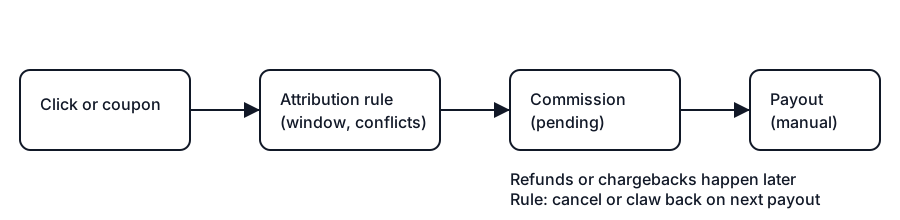
If you do only one thing: approve commissions after the refund window and pay on a predictable schedule. Most payout disputes are really refund timing disputes.
Below are four common approaches. None is perfect. The goal is to pick one that matches your stage.
Who it fits: you mainly work with creators who share a discount code.
What breaks first: coupon leakage and lost credit when customers buy without the code.
Main risk: you end up paying for deals you did not want to discount.
Who it fits: you want clean attribution without discounting.
What breaks first: cross device and cookie resets reduce credit.
Main risk: you under credit partners and the program feels unfair.
Who it fits: most early programs.
What breaks first: you need a clear rule for conflicts (link vs coupon).
Main risk: confusion if you do not document the rule.
Who it fits: you are under 20 active affiliates and want full control.
What breaks first: refunds complicate history and reporting becomes slow.
Main risk: you stay manual too long and stop growing.
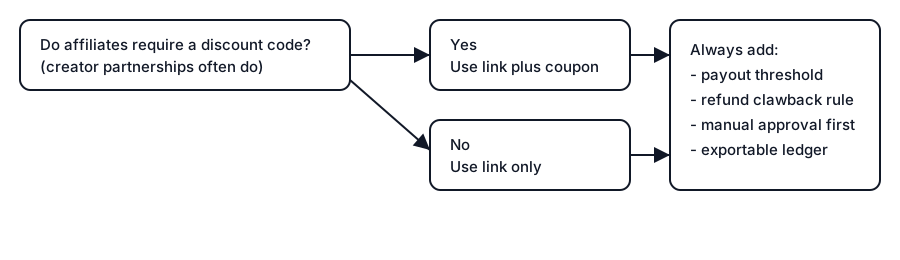
This keeps the program simple, reduces coupon leakage, and still lets you work with partners who require a code.
Primary attribution: We attribute a conversion to the last affiliate link click within 30 days.
Coupon fallback: If a coupon code is used, we attribute the conversion to the coupon owner unless a different affiliate link click happened within the last 24 hours.
Refunds and chargebacks: If a purchase is refunded or charged back, the related commission is canceled. If we already paid the commission, we may deduct it from a future payout.
Payout threshold: We pay commissions once an affiliate's net payable balance reaches $50.
Net payable balance: Net payable balance is calculated after refunds, chargebacks, and adjustments.
Be specific. Ambiguity causes payout disputes.
Start with link attribution. Add coupon fallback only if you need it.
The best fit depends on your operating constraint. TinyAffiliate is a strong fit when you want lean founder-controlled tracking and payout review. Tolt is attractive when speed matters, Partnero when you want broader partner-program automation, Rewardful when you want a polished recurring SaaS workflow, and FirstPromoter when you need a mature affiliate platform.
Common Paddle affiliate software options include TinyAffiliate, Tolt, Partnero, Rewardful, and FirstPromoter. The right choice depends on whether you need lightweight attribution and payout review, a Paddle-focused SaaS setup, broader partner automation, or a more mature affiliate platform.
Yes. The question is which attribution method you choose and how you handle refunds.
The affiliate platform first stores an affiliate identifier before checkout, then passes it into Paddle checkout metadata or custom data. Paddle webhooks send paid transaction and adjustment events back to the affiliate ledger, where commissions can be created, updated, canceled, or reviewed for payout.
Usually link attribution first, Paddle checkout custom data for the affiliate ID, webhooks for transaction and adjustment events, a clear refund window, and recurring commission rules that map back to Paddle transactions.
It can support the payment events, but most teams still need an affiliate portal, attribution logic, and payout workflow outside of Paddle itself.
Yes. TinyAffiliate can support a Paddle affiliate workflow when your site installs the TinyAffiliate tracking script, passes ta_shortId into Paddle customData, and connects Paddle webhooks so transactions, renewals, and refund adjustments can update the affiliate ledger.
Use coupons only when you need them. They help creators, but they increase leakage.
For most small programs, $25 to $100 is common. $50 is a solid default.
Cancel the commission on refund. If you already paid it, claw it back from the next payout.
Not at the start. Manual payouts keep you in control while you validate the program.
Use your real refund policy and add a small buffer. If your refund policy is 30 days, approve commissions at day 30 to 35, not day 7.
If you pay recurring commissions, set a ceiling (for example 6 to 12 months) and make sure you can reconcile the math to Paddle transactions.
Paddle affiliate tracking works best when you keep it simple. Pick one attribution method, write the rules down, and build a payout process you can audit.
Next step today: write your link vs coupon rule, set a payout threshold, and run a 2 week pilot with 5 to 10 affiliates.
If you want a simple affiliate program that stays auditable as you grow, TinyAffiliate focuses on tracking and payout ops without forcing automatic payouts.
I share practical notes on affiliate programs for SaaS.No spam. No hype.
Unsubscribe anytime. No spam.
Ready to launch?
If Rewardful feels like overkill, start simple: signup page + links + Stripe-attributed revenue.
A practical checklist for migrating affiliate platforms in SaaS: what to export, how to compare ledgers, how to handle refunds and clawbacks, and the safest cutover plan.
Read article
A founder-friendly guide to affiliate tracking for SaaS subscriptions: which event should earn commission, how to handle trials and plan changes, how recurring commissions work, and the tests that catch broken attribution.
Read article